Thursday, 25 July 2024

Oracle : Database Startup Time

 Oracle Instance Startup Time

SET LINES 2000
SET PAGES 9999
COLUMN INSTANCE_NAME FOR A20
SELECT
    instance_name,
    to_char(startup_time, 'HH24:MI DD-MON-YY') "STARTUP TIME"
FROM
    v$instance;


Startup history timing of Oracle Instance

COL INSTANCE_NAME FOR A10
SELECT
    instance_name,
    to_char(startup_time, 'HH24:MI DD-MON-YY')
FROM
    dba_hist_database_instance
ORDER BY
    startup_time DESC;


Uptime of Oracle Database

SET LINE 200
COLUMN HOSTNAME FOR A60
COLUMN INSTANCE_NAME FOR A60
COLUMN START_TIME FOR A60
COLUMN UP_TIME FOR A60
SELECT
    'HOSTNAME : ' || host_name,
    'INSTANCE NAME : ' || instance_name,
    'STARTED AT : ' || to_char(startup_time, 'DD-MON-YYYY HH24:MI:SS') start_time,
    'UPTIME : '
    || floor(sysdate - startup_time)
    || ' DAYS(S) '
    || trunc(24 *((sysdate - startup_time) - trunc(sysdate - startup_time)))
    || ' HOUR(S) '
    || mod(trunc(1440 *((sysdate - startup_time) - trunc(sysdate - startup_time))), 60)
    || ' MINUTE(S) '
    || mod(trunc(86400 *((sysdate - startup_time) - trunc(sysdate - startup_time))), 60)
    || ' SECONDS'                                                      up_time
FROM
    sys.v_$instance;

Tuesday, 17 October 2023

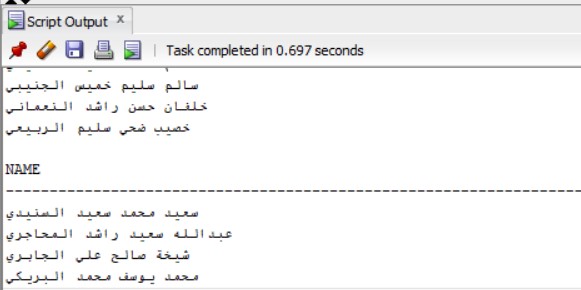
SQL Developer displaying Junk characters (??????)

Change the Encoding in SQL Developer Preferences as below Tools --> Preferences --> Environment --> Encoding --> UTF-8 --> Restart the SQL Developer
After Restart we get the output as below

Monday, 16 October 2023

EBS : SQL to find SID from Concurrent Request ID

SELECT a.request_id, d.sid, d.serial# ,d.osuser,d.process , c.SPID ,d.inst_id FROM apps.fnd_concurrent_requests a left outer join apps.FND_CONCURRENT_PROCESSES b on a.controlling_manager = b.concurrent_process_id left outer join GV$PROCESS c on c.pid = b.oracle_process_id left outer join GV$SESSION d on b.session_id=d.audsid WHERE a.request_id =&ccr_req_id

Sunday, 18 June 2023

Oracle: Purge UINIFIED AUDIT TRAIL

1. Get the count from audsys table:

    select count(1) from audsys.aud$unified;

2. Get the count from unified_audit_trail view:

    select  count(*) from unified_audit_trail;

3. Get the list of unified audit polices with action name and count

select unified_audit_policies,action_name,count(*) from unified_audit_trail group by unified_audit_policies,action_name;

4. Set the Timestamp that to be deleted as here it is set to 10 days before SYSDATE

begin

dbms_audit_mgmt.set_last_archive_timestamp(audit_trail_type=>dbms_audit_mgmt.audit_trail_unified,last_archive_time=>sysdate-10);

end;

/

 5. Execute the below PL/SQL block to delete the UNIFIED_AUDIT_TRAIL to the timestamp set above

set serveroutput on;

begin

DBMS_OUTPUT.PUT_LINE('Time Started: ' || TO_CHAR(SYSDATE, 'DD-MON-YYYY HH24:MI:SS'));

dbms_audit_mgmt.clean_audit_trail(audit_trail_type=>dbms_audit_mgmt.audit_trail_unified

,use_last_arch_timestamp=>TRUE);

DBMS_OUTPUT.PUT_LINE('Time Ended: ' || TO_CHAR(SYSDATE, 'DD-MON-YYYY HH24:MI:SS'));

end;

/

6. Execute the below PL/SQL block to delete All UNIFIED_AUDIT_TRAIL

set serveroutput on;

begin

DBMS_OUTPUT.PUT_LINE('Time Started: ' || TO_CHAR(SYSDATE, 'DD-MON-YYYY HH24:MI:SS'));

DBMS_AUDIT_MGMT.CLEAN_AUDIT_TRAIL(

audit_trail_type         =>  DBMS_AUDIT_MGMT.AUDIT_TRAIL_UNIFIED,

use_last_arch_timestamp  =>  FALSE);

DBMS_OUTPUT.PUT_LINE('Time Ended: ' || TO_CHAR(SYSDATE, 'DD-MON-YYYY HH24:MI:SS'));

end;

/


Sunday, 26 December 2021

MySQL: Fulsh hosts in the MySQL database

 Solution:

Execute the below command to flush the connections

mysqladmin -u root -h hostname -P 3351 -p flush-hosts

Tuesday, 7 December 2021

DB: Upload or Download a file from Oracle Table

 1. Create a directory "DB_Files_test" under D:\SURESH\03_Working\ in Windows


2. Connect as SYSDBA and create a directory as DB_FILES 

SQL> CREATE OR REPLACE DIRECTORY DB_FILES As 'D:\SURESH\03_Working\DB_Files_test';

Directory created.

--Grant read, write access on the directory to the user which you want to perform upload & download file

SQL> grant read, write on directory db_files to test;

Grant succeeded.


3. Create a table POC_FILE_STORAGE to store the files as BLOB

CREATE TABLE POC_FILE_STORAGE (

file_name VARCHAR2 (1000),

file_content BLOB)

/


4. Create the below procedure to convert a file to BLOB

CREATE OR REPLACE FUNCTION FILE_TO_BLOB(p_file_name VARCHAR2) RETURN BLOB AS

destination_location BLOB := empty_blob();

source_location BFILE := BFILENAME('DB_FILES', p_file_name);

BEGIN

DBMS_LOB.OPEN(source_location, DBMS_LOB.LOB_READONLY);

DBMS_LOB.CREATETEMPORARY(

lob_loc => destination_location

, cache => true

, dur => dbms_lob.session);

DBMS_LOB.OPEN(destination_location, DBMS_LOB.LOB_READWRITE);

DBMS_LOB.LOADFROMFILE(

dest_lob => destination_location

, src_lob => source_location

, amount => DBMS_LOB.getLength(source_location));

DBMS_LOB.CLOSE(destination_location);

DBMS_LOB.CLOSE(source_location);

RETURN destination_location;

END FILE_TO_BLOB;

/


5. Use Below PL/SQL block to store the file in the POC_FILE_STORAGE tables

DECLARE

v_blob BLOB;

BEGIN

v_blob := FILE_TO_BLOB ('OCA.pdf');

INSERT INTO POC_FILE_STORAGE VALUES ('OCA.pdf', v_blob);

COMMIT;

END;

/


6. Use Below SQL to list the records in the table POC_FILE_STORAGE table

SQL> col file_name for a20

SQL> set lines 200

SQL> select * from POC_FILE_STORAGE

FILE_NAME            FILE_CONTENT

-------------------- ----------------------------------------------------------------------------------------------------------------------------------------------------------------

OCA.pdf              255044462D312E360D25E2E3CFD30D0A363935342030206F626A0D3C3C2F46696C7465722F466C6174654465636F64652F466972737420313733372F4C656E67746820343933382F4E203136372F5479


7. Create the below procedure to convert BLOB to a file:

CREATE OR REPLACE PROCEDURE blob_to_file (i_dir    IN VARCHAR2,

                                          i_file   IN VARCHAR2,

                                          i_blob   IN BLOB)

AS

   l_file       UTL_FILE.file_type;

   l_buffer     RAW (32767);

   l_amount     BINARY_INTEGER := 32767;

   l_pos        INTEGER := 1;

   l_blob_len   INTEGER;

BEGIN

   l_blob_len := DBMS_LOB.getlength (i_blob);

   l_file :=

      UTL_FILE.fopen (i_dir,i_file,'WB',32767);

   WHILE l_pos < l_blob_len

   LOOP

      DBMS_LOB.read (i_blob,

                     l_amount,

                     l_pos,

                     l_buffer);

      UTL_FILE.put_raw (l_file, l_buffer, TRUE);

      l_pos := l_pos + l_amount;

   END LOOP;

   UTL_FILE.fclose (l_file);

EXCEPTION

   WHEN OTHERS

   THEN

      IF UTL_FILE.is_open (l_file)

      THEN

         UTL_FILE.fclose (l_file);

      END IF;

      RAISE;

END blob_to_file;

/


8. Use Below PL/SQL Block to download the file 

DECLARE

   v_blob   BLOB;

BEGIN

  select FILE_CONTENT into v_blob from POC_FILE_STORAGE where FILE_NAME='OCA.pdf';

  blob_to_file ('DB_FILES', 'OCA.pdf', v_blob);

END;

/

Monday, 22 November 2021

Oracle : Display Arabic Character in the Linux Terminal sqlplus Prompt

 Set the NLS_LANG parameter and connect as sqlplus and execute the command.

export NLS_LANG=AMERICAN_AMERICA.AL32UTF8

sqlplus / as sysdba

<your sql select statement>

Tuesday, 7 July 2020

locate: command not found

1. Install mlocate-0.26-8.el7.x86_64.rpm & findutils-4.5.11-6.el7.x86_64
2. Run "updatedb"
3. Now run the locate command

Thursday, 2 July 2020

SQL Client Installation on Linux machine

Solution:

1. Install below two RPMs

    oracle-instantclient12.2-basic-12.2.0.1.0-1.x86_64.rpm

    oracle-instantclient12.2-sqlplus-12.2.0.1.0-1.x86_64.rpm


2. Create the SQL.env file using below


ORACLE_HOME=/usr/lib/oracle/12.2/client64

PATH=$ORACLE_HOME/bin:$PATH

LD_LIBRARY_PATH=$ORACLE_HOME/lib

export ORACLE_HOME

export LD_LIBRARY_PATH

export PATH


3. Source the SQL.env file


4. Connection can be established using either SID/SERVICE name as below

  • Connect using SERVICE name: sqlplus "username/password@(DESCRIPTION=(ADDRESS=(PROTOCOL=TCP)(HOST= <hostname>)(PORT=1531))(CONNECT_DATA=(SERVICE_NAME=<SERVICE_NAME>)))"
  • Connect using SID name: sqlplus "username/password@(DESCRIPTION=(ADDRESS=(PROTOCOL=TCP)(HOST= <hostname>)(PORT=1531))(CONNECT_DATA=(SID=<SID_NAME>)))"
Note: To use the import/export utility on instant client install rpm oracle-instantclient12.2-tools-12.2.0.1.0-1.x86_64.rpm

Monday, 25 May 2020

JDBC Connectivity Testing in Linux command Line

Pre-req:
1. Download ojdbc8.jar from oracle website.
2. Compatability of Java, Database, JDBC are in below note id
    Starting With Oracle JDBC Drivers - Installation, Certification, and More! (Doc ID 401934.1)

Step-1:

Create the java file JDBCConnectivity.java as below code

import java.sql.*;
 class JDBCConnectivity{
     public static void main(String args[]) throws SQLException {
         Connection con = null;
         try{
             Class.forName("oracle.jdbc.driver.OracleDriver");
             String DatabaseURL = "jdbc:oracle:thin:@//<Hostname/Database IP Address>:<Port Number>/<Database Service Name>";
             System.out.println("jdbcurl=" + DatabaseURL);
             String UserName = "<Username>";
             String UsrPassword = "<Password>";
             con=DriverManager.getConnection(DatabaseURL,UserName,UsrPassword);
             System.out.println("Connected to the database Successfull.");
             Statement stmt=con.createStatement();
             System.out.println("Executing query");
             ResultSet rs=stmt.executeQuery("SELECT 1 FROM DUAL");
             while(rs.next())
                 System.out.println(rs.getInt("1"));
             con.close();
         }catch(Exception e){ System.out.println(e);}
         finally {
             con.close();
         }
 }
 }

Step-2:
Compile the java code

javac JDBCConnectivity.java

Step-3:

Run the java code using below command

java -Djava.security.egd=file:/dev/../dev/urandom -cp ojdbc8.jar:. JDBCConnectivity

Tuesday, 18 February 2020

DB : [INS-20802] Oracle Net Configuration Assistant failed

Error:

When we check the installation logfile we can find below error log

[FATAL] [DBT-06103] The port (5,500) is already in use.
   ACTION: Specify a free port.
Oracle Database Configuration Assistant failed.
Starting 'Oracle Database Configuration Assistant'
[FATAL] [DBT-06103] The port (5,500) is already in use.
   ACTION: Specify a free port.
Oracle Database Configuration Assistant failed.
Starting 'Oracle Database Configuration Assistant'
[FATAL] [DBT-06103] The port (5,500) is already in use.
   ACTION: Specify a free port.

Solution:

When you ping your hostname it will not be reachable

[oracle@testdb] ping testdb
ping: testdb : Name or service not known

Add the full hostname entry in /etc/hosts file & retry the database installation

192.168.1.1 testdb.local.com testdb

Monday, 6 January 2020

Python : Dummy service on 9999 port in Linux

#!/usr/bin/python
# Demo server to open port 9999
# Modified from Python tutorial docs
import socket
import sys
HOST = 'localhost'   # IP addresses or Hostname
PORT = 9999 # Open non-privileged port 9999
s = socket.socket(socket.AF_INET, socket.SOCK_STREAM)
print 'Socket created Successfully'
#Bind socket to local host and port
try:
    s.bind((HOST, PORT))
except socket.error as msg:
    print 'Bind failed. Error Code : ' + str(msg[0]) + ' Message ' + msg[1]
    sys.exit()
print 'Socket bind complete'
#Started listening on socket
s.listen(10)
print 'Socket now listening'
while 1:
    #waiting to accept a connection - blocking call
    conn, addr = s.accept()
    print 'Connected with ' + addr[0] + ':' + str(addr[1])
s.close()

save the above file as port_server.py

run the port_server.py in one terminal & try telnet the hostname with 9999

Monday, 6 May 2019

EBS : Service Component Container is not Running

Solution:

To Start the Workflow Services :

Log in as SYSADMIN in OAM then navigate to:

1. Sitemap > Generic Services > Status Overview > View All > Generic Service Component Container > select Workflow Agent Listener Service > Start

2. In the same page select Workflow Mailer Service > Start

EBS : Worflow mailer Parameter update from backend

$FND_TOP/sql/afsvcpup.sql

Example:
SQL> @$FND_TOP/sql/afsvcpup.sql

Component Id Component Name                 Component Status Type            Containe
------------ ------------------------------ ---------------- --------------- --------
       10000 ECX Inbound Agent Listener     STOPPED          WF_AGENT_LISTEN GSM
       10001 ECX Transaction Agent Listener STOPPED          WF_AGENT_LISTEN GSM
       10002 Workflow Deferred Agent Listen STOPPED          WF_AGENT_LISTEN GSM
       10003 Workflow Deferred Notification STOPPED          WF_AGENT_LISTEN GSM
       10004 Workflow Error Agent Listener  STOPPED          WF_AGENT_LISTEN GSM
       10005 Workflow Inbound Notifications STOPPED          WF_AGENT_LISTEN GSM
       10006 Workflow Notification Mailer   STOPPED          WF_MAILER       GSM
       10020 Web Services IN Agent          STOPPED          WF_JAVA_AGENT_L GSM
       10021 Web Services OUT Agent         STOPPED          WF_DOCUMENT_WEB GSM
       10022 Workflow Java Deferred Agent L STOPPED          WF_JAVA_AGENT_L GSM
       10023 Workflow Java Error Agent List STOPPED          WF_JAVA_AGENT_L GSM
       10040 WF_JMS_IN Listener(M4U)        STOPPED          WF_JAVA_AGENT_L GSM
       10041 Workflow Inbound JMS Agent Lis STOPPED          WF_AGENT_LISTEN GSM

Enter Component Id: 10006


Comp Param Id Parameter Name                                Default Value                  Value                          Req Reload
------------- --------------------------------------------- ------------------------------ ------------------------------ --- ------
        10055 Allow Forwarded Response                      Y                              Y                              N   Y
        10160 Alternate email parser                        oracle.apps.fnd.wf.mailer.Dire oracle.apps.fnd.wf.mailer.Dire Y   N
                                                            ctEmailParser                  ctEmailParser

        10161 Attach images to outbound emails              Y                              Y                              Y   Y
        10162 Attach stylesheet to outbound email           Y                              Y                              Y   Y
        10056 Attached URLs                                 WFMAIL:ATTACHED_URLS           WFMAIL:ATTACHED_URLS           Y   Y
        10057 Autoclose FYI                                 Y                              Y                              Y   Y
        10061 Debug Mail Session                            N                              N                              N   N
        10163 Direct response                               N                              N                              N   N
        10062 Discard Folder                                DISCARD                        DISCARD                        Y   N
        10063 Email Parser                                  oracle.apps.fnd.wf.mailer.Temp oracle.apps.fnd.wf.mailer.Temp Y   N
                                                            latedEmailParser               latedEmailParser

        10178 Enable stylesheet references                  N                              N                              Y   Y
        10064 Expunge Inbox on Close                        Y                              Y                              Y   Y
        10166 Framework Application ID                      1                              1                              Y   N
        10165 Framework Responsiblity                       20420                          20420                          Y   N
        10167 Framework URL timeout                         30                             30                             Y   N
        10164 Framework User                                0                              0                              Y   N
        10065 From                                          Workflow Mailer                Workflow Mailer                Y   Y
        10066 HTML Agent                                                                   http://R122.localb.e Y   Y
                                                                                           rnet.in:8040/

        10231 HTML delimiter                                DEFAULT                        DEFAULT                        Y   N
        10168 HTTP User Agent                               Mozilla/4.76                   Mozilla/4.76                   Y   Y
        10303 Inbound Connection Retry Count                3                              3                              Y   N
        10068 Inbound Protocol                              imap                           imap                           Y   N
        10302 Inbound Security Protocol                                                    NONE                           Y   N
        10069 Inbound Server Name                                                          NoImapHost.NoImapDomain        Y   N
        10082 Inbound Thread Count                          1                              0                              Y   Y
        10169 Inbound connection time out                   120                            120                            Y   N
        10170 Inbound message fetch size                    100                            100                            Y   N
        10070 Inbox Folder                                  INBOX                          INBOX                          Y   N
        10071 Inline Attachments                            N                              N                              N   Y
        10175 Invalid More Information Response Notificatio WFMAIL:OPEN_INVALID_MORE_INFO  WFMAIL:OPEN_INVALID_MORE_INFO  Y   Y
              n

        10074 Invalid Response Notification                 WFMAIL:OPEN_INVALID            WFMAIL:OPEN_INVALID            Y   Y
        10230 Invalid address list size                     100                            100                            Y   N
        10280 Java Mail API Version                         1.5.4                          1.5.4                          Y   N
        10060 Log Level                                     5                              5                              Y   Y
        10073 Mailer Node Name                              WFMAIL                         WFMAIL                         Y   N
        10084 Max Error Count                               10                             10                             Y   N
        10171 Maximum Ignore List size                      1000                           1000                           Y   N
        10172 Maximum Response lookup code cache size       100                            100                            Y   N
        10173 Maximum returned email list size              100                            100                            Y   N
        10072 Message Formatter                             oracle.apps.fnd.wf.mailer.Noti oracle.apps.fnd.wf.mailer.Noti Y   N
                                                            ficationFormatter              ficationFormatter

        10240 More Information Response Warning Notificatio WFMAIL:MORE_INFO_ANSWERED      WFMAIL:MORE_INFO_ANSWERED      Y   Y
              n

        10077 Open FYI Notification                         WFMAIL:OPEN_MAIL_FYI           WFMAIL:OPEN_MAIL_FYI           Y   Y
        10075 Open Notification                             WFMAIL:OPEN_MAIL               WFMAIL:OPEN_MAIL               Y   Y
        10076 Open Notification (Direct Response Parsing)   WFMAIL:OPEN_MAIL_DIRECT        WFMAIL:OPEN_MAIL_DIRECT        Y   Y
        10176 Open Notification (More Information Request)  WFMAIL:OPEN_MORE_INFO          WFMAIL:OPEN_MORE_INFO          Y   Y
        10058 Outbound Cancelled Notification               WFMAIL:CANCELED                WFMAIL:CANCELED                N   Y
        10059 Outbound Closed Notification                  WFMAIL:CLOSED                  WFMAIL:CLOSED                  N   Y
        10179 Outbound HTML Summary Notification            WFMAIL:SUMHTML                 WFMAIL:SUMHTML                 Y   Y
        10078 Outbound Protocol                             smtp                           smtp                           Y   N
        10301 Outbound Security Protocol                                                   NONE                           Y   N
        10079 Outbound Server Name                                                         10.0.17.17                 Y   N
        10092 Outbound Summary Notification                 WFMAIL:SUMMARY                 WFMAIL:SUMMARY                 Y   Y
        10086 Outbound Thread Count                         1                              1                              Y   Y
        10094 Outbound Warning Notification                 WFMAIL:WARNING                 WFMAIL:WARNING                 Y   Y
        10177 Outbound connection time out                  120                            120                            Y   N
        10274 OutboundUser                                                                 username@local.com                 N   N
        10080 Processed Folder                              PROCESS                        PROCESS                        Y   N
        10088 Processor Close on Read Timeout               Y                              Y                              Y   N
        10081 Processor Error Loop Sleep                    60                             60                             Y   N
        10085 Processor Max Loop Sleep                      60                             60                             Y   N
        10083 Processor Min Loop Sleep                      5                              5                              Y   N
        10087 Processor Read Wait Timeout                   10                             10                             Y   N
        10233 Processor defer reading event data            Y                              Y                              Y   N
        10089 Reply-to Address                                                             username@local.com                 Y   Y
        10090 Reset NLS                                     N                              N                              Y   Y
        10229 SSL Trust store                               NONE                           NONE                           N   N
        10091 Send Access Key                               Y                              Y                              Y   Y
        10228 Send e-mails for canceled notifications       Y                              Y                              Y   N
        10227 Send warning for unsolicited e-mail           Y                              Y                              Y   Y
        10093 Test Address                                  NONE                           NONE                           N   Y
        10174 Unsolicited event threshold                   2                              2                              Y   N
        10054 Username                                                                     NoImapUser                     Y   N

Enter the Comp Param Id to update : 10069

You have selected parameter : Inbound Server Name
Current value of parameter  : NoImapHost.NoImapDomain


Enter a value for the parameter  : 10.0.17.17
Disconnected from Oracle Database 11g Enterprise Edition Release 11.2.0.4.0 - 64bit Production
With the Partitioning, Real Application Clusters, Automatic Storage Management, OLAP,
Data Mining and Real Application Testing options
[applprod@R122 ~]$

Monday, 11 March 2019

EBS : After cloning forms are not opening FRM-40010

Error: 

FRM-40010: Cannot read form , fnd/12.0.0/forms/US/FNDSCSGN

Solution:

1. Backup $CONTEXT_FILE
2. Change variable s_formsfndtop in the context file from "FND_TOP" to "full path of FND_TOP"
Eg: /data/appl/apps_st/appl/fnd/12.0.0
3. Run AutoConfig
4. Restart application services
5. Retest the forms are opening.


Friday, 22 February 2019

Linux: Useful Commands

Check Serial number for Linux machines

dmidecode -s system-serial-number

Find the number of Physical core in Linux

cat /proc/cpuinfo | grep "physical id" | sort | uniq | wc -l

Friday, 15 February 2019

VNC server Commands


Enable GUI Mode in VNC

Add "gnome-session &" to the file /root/.vnc/xstartup as below and start new session of VNC

#!/bin/sh

xrdb $HOME/.Xresources
xsetroot -solid grey
vncconfig -iconic &
xterm -geometry 80x24+10+10 -ls -title "$VNCDESKTOP Desktop" &
twm &
gnome-session &


Kill VNC session:

vncserver -kill <:{vncserver session id}>

eg: vncserver -kill :1


Start VNCserver:

Command: vncserver to start VNC server


Change Password of VNC server serssion

Command: vncpasswd


Monday, 31 December 2018

Find Weblogic PSU

Solution:

[user@hostname bin]$ cd /u02/app/Oracle/Middleware/wlserver_10.3/server/bin
[user@hostname bin]$ . setWLSEnv.sh

[user@hostname bin]$ java weblogic.version

WebLogic Server 10.3.6.0.181016  Tue Nov 15 08:52:36 PST 2011 1441050

Use 'weblogic.version -verbose' to get subsystem information

Use 'weblogic.utils.Versions' to get version information for all modules
[user@hostname bin]$

Find Weblogic Version

Solution-1:

[user@hostname ~]$ cd /u02/app/Oracle/Middleware/wlserver_10.3/server/lib/
[user@hostname lib]$ java -cp weblogic.jar weblogic.version

WebLogic Server 10.3.6.0  Tue Nov 15 08:52:36 PST 2011 1441050

Use 'weblogic.version -verbose' to get subsystem information

Use 'weblogic.utils.Versions' to get version information for all modules
[user@hostname lib]$

Thursday, 27 December 2018

RHEL : Enable/Disable IPV6

Disable IPv6:
As root user run
sysctl -w net.ipv6.conf.all.disable_ipv6=1
sysctl -w net.ipv6.conf.default.disable_ipv6=1

Enable IPv6:
As root user run
sysctl -w net.ipv6.conf.all.disable_ipv6=0
sysctl -w net.ipv6.conf.default.disable_ipv6=0

Oracle : Database Startup Time

 Oracle Instance Startup Time SET LINES 2000 SET PAGES 9999 COLUMN INSTANCE_NAME FOR A20 SELECT     instance_name,     to_char(startup_time,...